

Fraud Awareness

If you notice any unauthorized transactions or suspect fraud, reach out to us immediately to report this at 765-236-0600.

Holiday Fraud Scams

Shipment Updates
Watch for a text or email asks you to click a link regarding a package. If you didn’t order anything, this is a scam, and the message should be deleted. If you did order something, always check with the merchant rather than clicking a potentially harmful link.
Secret Shopper
Watch out for requests to be a secret shopper and purchase gift cards. Fraudsters will ask you to visit a business, report its hospitality and buy gift cards to send to them. Please be mindful that anyone asking for gift cards or money in return is a scam.
Charitable Giving
Be mindful of ‘look-a-like’ charities that pressure you into sending money. A real charity would never pressure you to send donations and can tell you how your money would be used. A quick internet search can help you verify if a charity is legitimate.
Online Shopping
Check holiday deal ads that link to a new website. Verify you are truly on the correct website (look for https://) and do some research to see if there are any reviews before putting sensitive information online. To be extra safe, consider not saving your payment information during checkout.
Tax Related Phishing Emails
A common scam expected to intensify soon will involve emails pretending to be from the IRS or others in the tax industry. These frequently involve unexpected, good news, like a tax refund. But they can also involve variants telling people they have a tax bill or have tax documents available to download. Use caution and double check links before clicking.

The latest scams we're seeing

Phone Number Spoofing
Spoofing is making the Caller ID appear as the bank. If the call seems suspicious, do not give out your information and simply hang up and contact your banker directly. Dialing the bank's number will always lead you directly to our local Call Center team for assistance.
Debit Card Fraud Alert Text Messages
Scammers are sending fake text messages claiming there was suspicious activity on your debit card and asking you to reply. If you respond, they may call pretending to be your bank and try to trick you into sharing sensitive information such as online banking credentials, account numbers, or MFA codes. Remember: your bank will never ask for passwords, verification codes, or other secure login information by phone, text, or email.
Bank or Government Official Impersonations
Scammers often pretend to be representatives from a bank, government agency, or other trusted organization to appear credible and gain your trust. Their goal is to trick you into sharing sensitive information such as your Social Security number, account information, passwords, or security codes. These scams can result in significant financial losses, so always verify who you're speaking with before providing any personal information.
AI Enhanced Fraud and Deepfakes
Scammers can use information from social media sites like Facebook and LinkedIn to create convincing scams, including AI-generated voice clones of loved ones or friends. They often create a sense of urgency or panic and request money or personal information. To stay safe, always verify the situation by calling your loved one directly using a phone number you know and trust, rather than responding to the caller or message.

Common scams to be aware of

Scammers post fake job opportunities on legitimate websites, conduct quick interviews, and then ask for money or personal information. Be cautious of upfront fees, pressure to act quickly, or jobs that seem too good to be true—legitimate employers will never ask you to pay for a job.

Scammers promise guaranteed or unusually high returns through cryptocurrency investments and often create a sense of urgency. Remember, no legitimate investment can guarantee profits, and unsolicited investment offers should be approached with caution.

These scams use professional-looking websites to advertise popular products at unusually low prices but never deliver the item. Protect yourself by checking reviews, verifying contact information, and being skeptical of deals that seem too good to be true.

Scammers use alarming headlines or urgent messages to entice you into clicking links that can steal personal or financial information. Avoid clicking unexpected links and verify messages through trusted sources before taking action.

Scammers build online relationships to gain trust before asking for money, gifts, or cryptocurrency. Never send or receive money on behalf of someone you have not met in person, and be cautious of requests for secrecy or financial assistance.

Scammers pose as tech support representatives and claim your computer is infected to gain remote access, steal information, or collect payments. Legitimate companies will not contact you unexpectedly to fix your device or ask for login credentials or payment over the phone.
Fraudsters will target people looking for loans online. To get the loan process started, they will request account information to ‘make a deposit on your behalf’ or mail you a check for deposit. They will then request this money back, leaving you responsible for when the check is returned. 

Signs of a scam:
      • The loan company asks for unusual information such as your online bank information or access to your computer.
      • The loan company asks for money back from you.
      • You found the loan through an online or social media ad (while it's possible the ad was legitimate, always use extra caution when considering a digital loan ad).
 
What to do:
  • Always verify a company before releasing personal information.
  • Be skeptical, ask questions, research independently, and trust your banker.

Someone posing as a company (usually Amazon, Microsoft, Norton Antivirus, or Best Buy Geek Squad) will state you owe them money and attempt to gain access to your computer.  Once access is gained, they will use your computer to make it appear as if they've given you a refund and overpaid you, and request the difference back. Fraudsters will push to have money wired to an account to ‘pay back’ the money they are owed or insist you send them gift cards.

Signs of a scam:
      • The person is suddenly interested in your finances or sending/receiving money.
      • You are asked to buy gift cards. Legitimate companies will not ask for gift card payments.
      • You are told not to tell anyone or to not tell the bank what you're doing.
      • They have requested access to your computer or bank information.
      • You do not use the service/product this person is saying that you do.
      • You are asked to click suspicious links or download programs on your computer.

Online Dating Scams Infographic

Has an online love interest asked you for money? That's a scam. In the past five years, people have reported losing a staggering $1.3 billion to romance scams, more than any other FTC fraud category. The numbers have skyrocketed in recent years – reported losses hit a record $547 million in 2021. That’s more than six times the reported losses in 2017 and a nearly 80% increase compared to 2020. 

Signs of a scam:
  • Professes love quickly
  • Claims to be overseas for business or military service
  • Claims to be a successful investor (especially in cryptocurrency) who offers investment advice
  • Asks for money, and lures you off the dating site
  • Claims to need money — for emergencies, hospital bills, or travel
  • Plans to visit, but can't because of an emergency
  • Many people report being contacted on online dating apps, but reports of unexpected private messages on social media are also common.
 
What to do:
  1. Slow down — and talk to someone you trust. Don't let a scammer rush you.
  2. Never wire money from your bank account, buy gift cards, send cryptocurrency, or wire money to an online love interest. You won't get it back.
  3. Contact your bank right away if you think you've sent money to a scammer.
  4. Report your experience to the online dating site and to the FederalTrade Commission: ReportFraud.ftc.gov


Source: Information originally published from the FTC and ABA Foundation

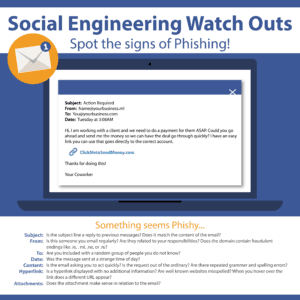
Phishing is when criminals send emails attempting to get you to reveal personal or financial information or usernames and passwords.

Business Email Compromise is when a criminal pretends to be a CEO or company president.  They will use this fake email to get users to wire money or pay false invoices to false accounts.


Vishing is when criminals use text messages to send fake information or try to get you to click on a malicious link. Criminals can also spoof caller ID to get you to believe you are receiving a phone call from a trusted source.

Tips to avoid these scams:
  • Don’t answer unknown numbers and don’t trust caller ID. Scammers typically don’t leave messages.
  • Don’t provide any personal information, usernames, or passwords over the phone.
  • Your bank or credit card company will not call and ask for your full social security number, passwords or card numbers over the phone.
  • If a caller is urgent about you sending or transferring money, this is a sign that you could be dealing with a criminal.
  • If an email is too good to be true, it could well be a phishing scam.
  • You can use Google to search for similar emails or scams.

Malware and ransomware are malicious software that can be installed on your computer to steal information (such as usernames and passwords, your browser history or files on your computer), encrypt files and demand money to unlock them or corrupt your files or operating system. 

Tips to avoid these scams:
  • Keep your operating system up to date! Install those automatic updates when they are available and go ahead and do that reboot (do this for cell phones and tablets as well).
  • Keep your software up to date. Update your browser software, your antimalware software, and all third-party software (like Adobe) on your devices.
  • Use a reputable antivirus/antimalware software and keep it up to date. If you receive a notification that your subscription has expired, you are no longer protected.
  • Only install apps on your cell phone and tablets from the official app store (for both Apple and Android devices).
  • Don’t click on links you are not expecting in email or open attachments from unknown sources or that you are not expecting.
  • Always keep important information backed up via cloud storage or an external drive.

Security tips for peace of mind

ATM and Debit Cards are a great way to provide access to your money 24/7.  Criminals would love to use your cards to access your money as well.  Here are some tips to help keep your cards safe.

  • Memorize your PIN number (don’t write on your card or share it with anyone).
  • Check all ATMs or Gas Station pay at the pump for any signs of tampering.
    • ATM or pay at the pump skimmers are devices that are inserted by criminals on legitimate devices. They are used to steal your card information and your PIN.
    • Report any signs of tampering to branch management staff.
  • Always check your surroundings when you approach an ATM to make sure there is no one suspicious lingering around.
    • If you feel uncomfortable, do not complete your transaction and report to branch management staff.
  • Regularly review your account. If you notice any unauthorized transactions, reach out to us immediately to report this at 765-236-0600.

Think of passwords as one of the layers of defense to protect your valuables (your accounts).  The better your password, the better your defense.  Here are some good practices when it comes to passwords:

  • Passwords should be unique to every application or site you use.
  • Once a password is required to be changed, never use it again.
  • The longer the password, the better. Aim for passwords to be at least 15 characters long.
  • Don’t use passwords that are easily guessed (birthdays, names or your social security number).
  • Sprinkle in capital letters, numbers and special characters.
  • Utilize a password safe to keep track of all of your passwords (and most can tell you about the overall health of your passwords).
  • Only use a trusted device to access your online accounts.  Don't use public computers.
  • Be mindful of potential phishing scams.
  • Always choose a strong password and don't reuse passwords.
  • Use multi-factor authentication when you can. CFB offers MFA for our online banking products.
  • Make sure your wireless connection is safe.
  • Make sure your online banking sites utilize encryption on their sites.
  • If you feel that your account may have been compromised, please call 765-236-0600 to discuss options related to your account.

Click here to watch our webinar recording about the importance of Cyber Insurance for business and nonprofit organizations. 

If you need to file a complaint or report identity theft, please utilize these external sites:

Internet Crime Complaint

The IC3 accepts online internet crime complaints.

Identity Theft

IdentityTheft.gov can help you report and recover from identity theft.

If you notice any unauthorized transactions or suspect fraud, reach out to us immediately to report this at 765-236-0600.